Звітність
Функція звітності застосунку Відпустки дозволяє менеджерам переглядати відпустки команди за співробітником, типом або залишком балансу. Це дозволяє менеджерам бачити хто бере відпустку, скільки вони використали, які типи використовуються частіше, та скільки ще доступно кожному співробітнику.
Важливо
The reporting feature of the Time Off app is only available to users with the correct access rights, typically managers.
За співробітниками
Перегляд відпусток за співробітниками допомагає менеджерам відстежувати моделі використання, контролювати залишки балансів, забезпечувати дотримання політики та планувати заміщення на час майбутніх відсутностей. Щоб переглянути список запитів співробітників на відпустку, перейдіть до .
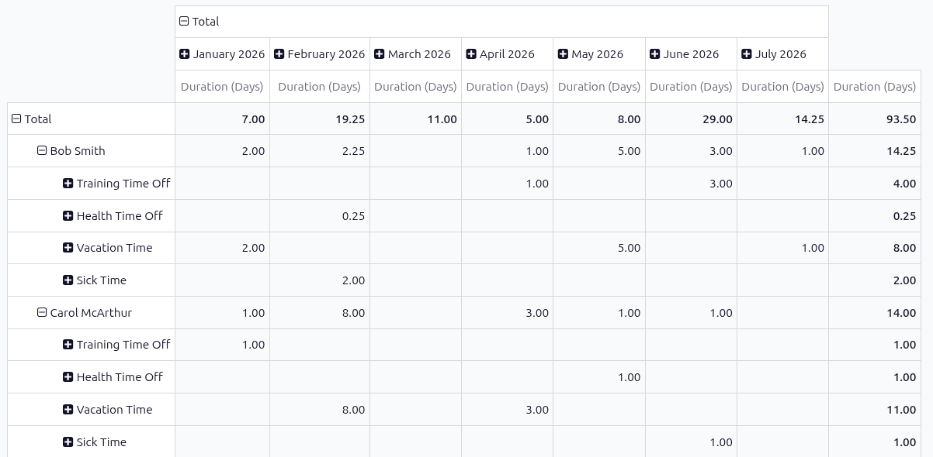
The default report presents the current year’s data in a pivot table, with the months populating the columns, and the employees populating the rows. The report displays the various time off taken by each employee, with a status of either Approved or To Approve, the amount of time off used for each month (the Duration (Days)), and the various totals.
Примітка
All time off is calculated in days, including time off types configured to be taken in hours.
Odoo automatically converts all time off hours into their day equivalent. For example, two hours
of time off is presented as 0.25 days.
Див. також
За типом
Перегляд відпусток по всій компанії за типами може допомогти менеджерам визначити, чи використовують співробітники свої відпустки, які типи використовуються частіше за інші, та виявити будь-які тенденції. Високі підсумки в певних типах відпусток, наприклад, лікарняних, можуть свідчити про проблеми зі здоров’ям або моральним станом.
To view a graph of all time off, organized by time off type, navigate to . This shows all time off requests with a status of Approved or To Approve in a default bar chart.
Each time off type displays three columns of information:
Allocation: This blue-colored bar indicates the total amount of time off allocated to employees.
Time Off: This red-colored bar indicates the amount of time off requested, including both past and scheduled future time off, for both approved and pending requests.
Balance: This green-colored bar indicates the total balance of unused time off.
Примітка
If the time off type is configured to not require an allocation, the Allocation column does not appear.
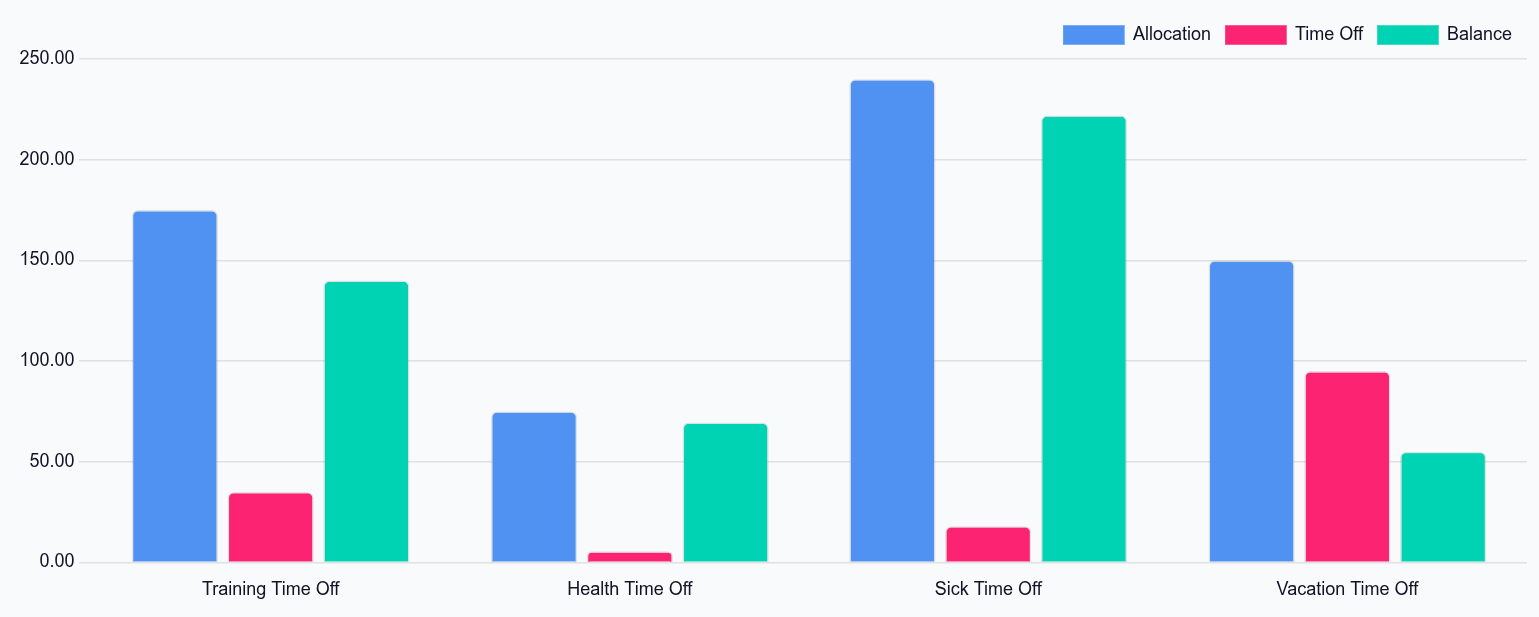
Hover over a column to view the total Duration (Days) and click on a bar to view a detailed list of all the individual records for that bar.
Кожен запит відображається з такою інформацією: Співробітник, Кількість днів, Тип запиту, Дата початку, Дата закінчення, Статус та Опис.
Звіт можна також відобразити іншими способами. Клацніть відповідну кнопку у верхньому правому куті сторінки, щоб переглянути дані в такому вигляді. Доступні такі варіанти: Графік (вид за замовчуванням), Список або зведена таблиця Зведена.
Після вибору з’являються додаткові параметри для цього конкретного вибору. Для отримання детальнішої інформації про звіти та їхні різні параметри зверніться до документації з звітності.
Баланс
When some time off types have restrictions, such as rollover rules and balance limits, viewing time off balances can help managers and time off approvers see a high-level overview of time off. If certain employees have time off that will expire soon, they can be infomred and adjust their schedules accordingly.
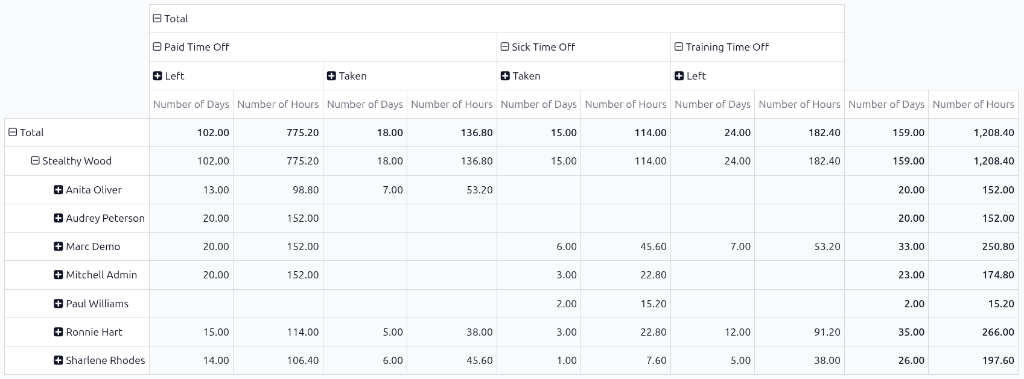
To view all time off balances for the current year, navigate to . The Balance report shows all time off balances in a default pivot table. The employees populate the rows, while the various time off types populate the columns.
Each time off type displays the Number of Days and Number of Hours remaining for the following:
Left: The remaining amount of time off for the year.
Planned: The amount of time off scheduled for the remainder of the year.
Taken: The amount of time off already taken for the year.